|
MDS PulseNET
Network Management Software
Monitoring and managing the health of your network is a critical consideration when designing, purchasing, and deploying equipment for your communications system. Equally important is ensuring that you maximize your network’s return on investment by increasing system throughput and uptime, improving the utilization of networked devices, and finally, supporting the deployment of maintenance resources when problems surface. MDS PulseNET™ Network Management Software was designed specifically for MDS Industrial Radio communication systems and satisfies the real-time needs of customers who are responsible for managing them. MDS PulseNET software is unique, as it requires no customization to get started – offering true, out-of-the box functionality. With PulsePAK add-on, support for specific third party devices allows you to discover, monitor, and take action on your multi-vendor network. MDS PulseNET Enterprise is integrated with MDS LaunchNET™ provisioning tool to provide a seamless zero or one-touch experience. Key Benefits – Return on Network Investment
|
||||||||||||||||||||||||||||||||||||||||
Purpose Built for Industrial Communications
With over two million devices installed around the world and 30+ years of experience, GE is aware of the challenges our customers face when it comes to effectively managing their communication networks. MDS PulseNET software provides the insight and detailed system performance allowing you to intelligently and proactively manage your radio communications network.
Optimized for MDS Communication Products
MDS PulseNET is designed specifically for MDS devices and can also support a host of other devices.
High Availability
MDS pulseNET Enterprise allows for high availability configuration which can reduce downtime to provide 24X7X365 access. The software may be installed in multiple hardware configurations that provide flexibility and redundancy.
Additional features include:
Robust Monitoring of Important Performance Parameter
The software is designed to monitor the critical elements of a communications network. The software helps prioritize corrective actions for vast amounts of raw data that is created and stored over time. It can also trigger specific actions based on warning thresholds, such as sending messages to trouble ticketing systems or other management systems. Additionally, these event-triggering thresholds can be easily changed within the software to meet unique customer requirements. Historical performance data is available for several parameters including:
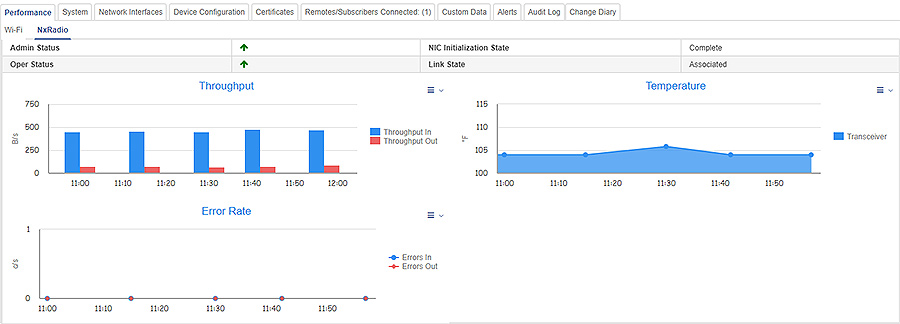
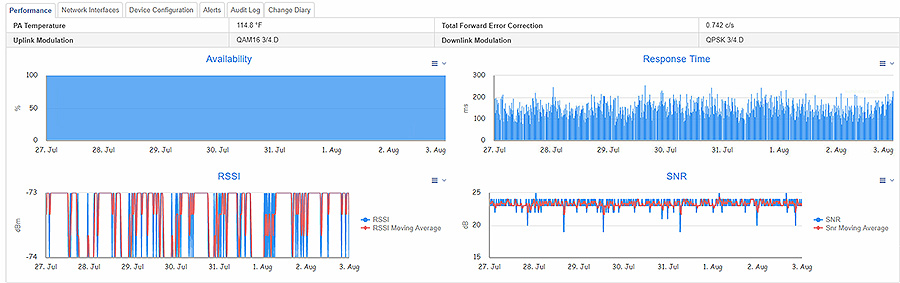
MDS PulseNET provides easy to review radio device performance screens showing the critical radio parameters such as: RSSI, SNR BER, Throughput, and Availability.
Easy Installation & Rapid Deployment
MDS PulseNET software requires minimal effort to install and operate, provides pre-built specific device warning thresholds to eliminate the guesswork, and provides visibility into radio communications that have historically been unmanaged.
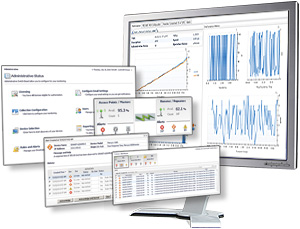
MDS PulseNET software provides multiple, concurrent, role-based logins through a web interface so that each user is able to see exactly what they need to fulfill their individual responsibilities. MDS PulseNET also provides the operator with immediate access to performance trending graphs through the same simple navigation scheme. It normalizes the views for disparate technologies into simplistic and easy-to-use dashboards. The main dashboard provides a high level status of each set of functional components being monitored.
Once your system is properly configured, it can automatically discover your network devices, assign licenses to the devices and begin monitoring the network. When used with MDS LaunchNET provisioning tool, new provisioned devices may be automatically added into PulseNET Enterprise for a complete and seamless network management solution.
The following GE MDS devices can be monitored by MDS PulseNET (minimum firmware version in parentheses):
PulsePAK add-on supports a number of third-party devices, allowing you to discover, monitor, and take action on your multi-vendor network.
With PulsePAK installed you can:
1. Out-of-the-box capability for monitoring third-party devices is enhanced in each release. Please contact a GE MDS Sales Representative to determine if a specific third-party devices is supported by the current version of PulseNET Enterprise.
2. Feature planned for a future release of PulseNET and PulseNET Enterprise.